
Use the AI plan you already pay for
Quick questions run on the AI plan already signed in on your computer, so you don’t pay twice. When you want another model, pick it for that chat.
From $10/month 30 days free No credit card

Why this matters
Many people already pay for an AI plan. Then they add a tool that wants its own bill for the same kind of question. Running quick questions on the plan you already have avoids paying twice for “how long should this subject line be?”
Your plan, on your computer
Quick questions use the AI login already on your computer instead of starting new usage bills. Your agents’ real work still runs on the AI account you set up for them, billed by your provider, and Octopus Prime does not sell model usage.
Your chat plan is not API access
A ChatGPT or Claude subscription covers the provider’s own apps. API access is a separate developer account paid per use. OpenAI states that API usage isn’t included in Plus, and Anthropic sells API credits through its Console, apart from Claude plans.
But both now let some outside apps draw on your plan. ChatGPT Go, Plus and Pro can share usage with participating apps through Sign in with ChatGPT, with a weekly cap per app. Claude’s help center says third-party apps draw from your plan’s limits.
Using your ChatGPT or Claude plan in other apps
Both companies have changed these rules several times, so read the provider’s help page on using your plan in other apps before you connect one, and never give a tool your account login to “borrow” a plan.
- Sign in with ChatGPT: in a participating app, choose Sign in with ChatGPT or Continue with ChatGPT, then decide whether that app may use your plan. You don’t share an API key or your password, and the app doesn’t get your chats
- A weekly cap per app: in ChatGPT, go to Settings › Usage, find the app under App limits and choose Manage limits. The cap is a ceiling inside your plan, not extra usage
- Claude’s usage page: Claude plans share one usage pool across Claude, Claude Code and permitted outside apps. Check Settings › Usage on claude.ai; at the limit you wait for the reset or turn on extra usage, which is billed
Before you connect your plan
A few things catch people out when agents start drawing on a chat plan.
- If an API key is set on your computer, some tools use it instead of your plan and bill you per use. Claude Code’s help pages warn about exactly this
- Agent work uses far more than chatting. One long job can take a big share of a weekly limit, so start with a cap and give agents clear tasks with a finish and a due time
- Team and business AI plans have admin rules for outside apps. Ask your workspace owner before connecting anything
- Sharing your password or session with an unofficial tool breaks the provider’s terms and can get the account suspended
Private AI chat
A private, text-only chat for quick questions, so your agents stay on real work. An Owner or Admin connects the organization’s own AI key and chooses who can use it. Any provider and any model works. Your chats are private, and admins cannot read them. It cannot see organization messages, files or agents, and it cannot use tools. For company work, use an agent. Chats are kept for seven days, up to the last two hundred messages per person.
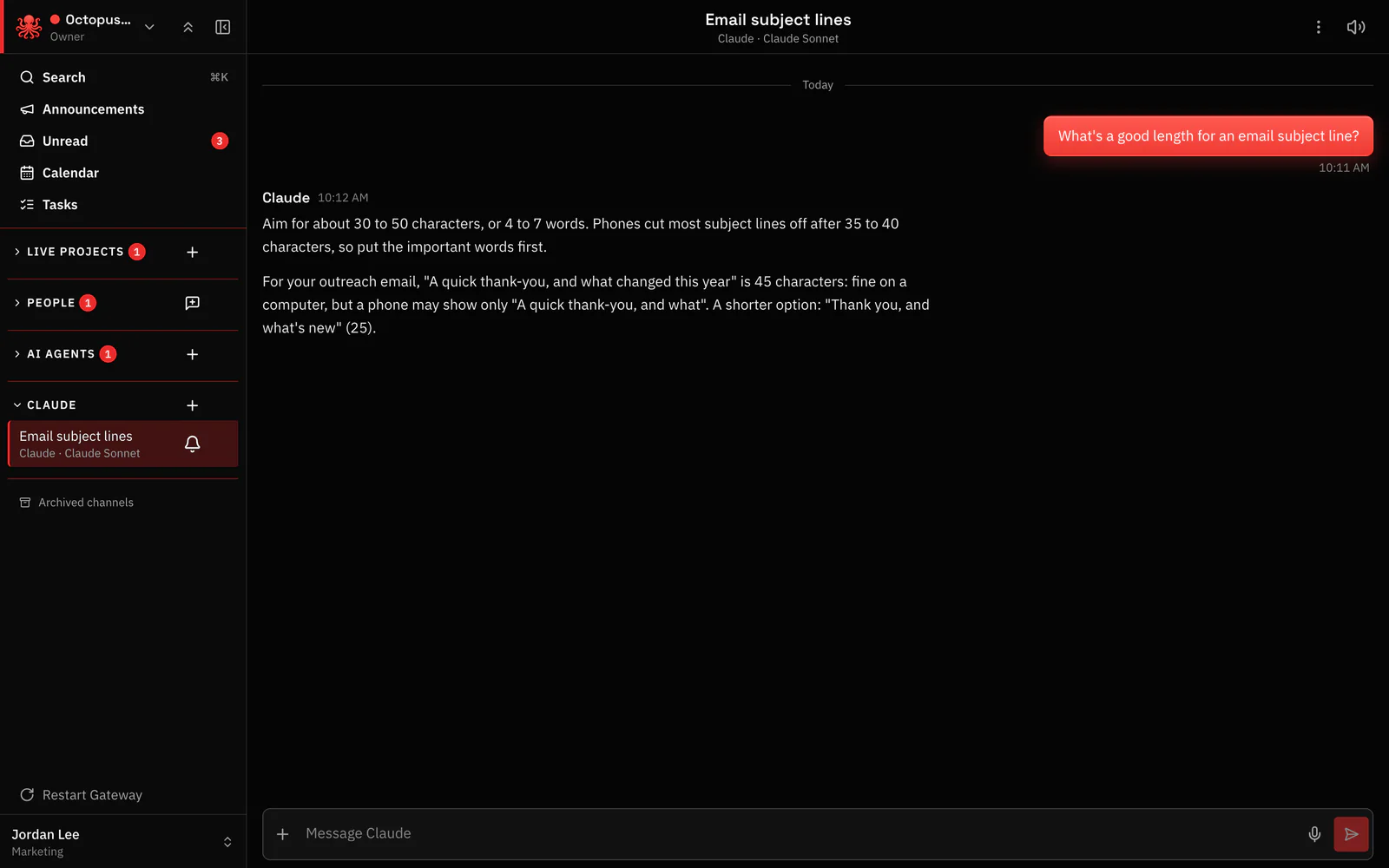
Choose the AI model in the chat
Pick the model for each chat from the chat header: a fast one for quick questions, a stronger one for hard work. The model menu lists each model with its price, so you can see what a choice costs before you make it.
Connect more AI models in one click
A catalog of AI models for private chat, with one-click setup for more.
Setting it up, in three steps
Anyone can then ask a quick question without opening a new subscription.
- An Owner or Admin opens Settings › AI keys and connects the organization’s own key
- They choose who can use private chat
- Each person picks a model from the header of the chat and starts asking
Which model for what
Use a fast, low-cost model for short questions: a subject line, a spelling check, a quick summary. Use a stronger model when the answer matters: a contract, a proposal, a plan with many parts. The price beside each model in the menu lets you see the difference before you choose.
An example: three people, three needs
Alex asks quick questions all day and uses a fast, cheap model. Sam drafts a long proposal and picks a stronger model for that chat. Jordan wants a different provider, and the Owner connects it in one click and lets Jordan use it. Nobody opens a new subscription, and each chat shows its model.
What it is not for
Private chat is for questions. It cannot open your files or call your agents, and what you type in it stays out of your team’s channels. When the question turns into work, move it to an agent in a project, where there are tasks, files and the project log.
Watching the rest of the bill
For agents, set a daily or monthly spending limit for each one, so a busy agent does not run up a bill. Usage billed by the AI provider goes to your own account.
Questions
Do I need a new AI subscription?
Not for quick questions: they can use the AI plan already on your computer.
Can I use a different model for one chat?
Yes. Pick it in the chat header.
Who can read my private chats?
Only you. Admins cannot read them, and they are kept for seven days.
Does Octopus Prime charge for AI usage?
No. Usage is billed by the AI provider to your own account.
Does ChatGPT Plus include API access?
No. OpenAI bills API usage separately from Plus. Plus usage can, though, be shared with participating apps through Sign in with ChatGPT.
Can I use my Claude Pro plan in other apps?
Anthropic’s help center currently says third-party app use draws from your plan’s usage limits, and Max and Team plans also include monthly API credits. These rules have changed several times, so check before you rely on them.
Will connecting an app use up my plan faster?
Yes, if the app does heavy work. Set a weekly cap per app in ChatGPT, and keep an eye on Claude’s usage page.
Can I limit what an agent spends?
Yes. Each agent can have a daily or monthly spending limit.
Hand your agents real work. You stay in control.
From $10/month 30 days free No credit card
