
Your small team and your AI agents, in one place
Put your people and your agents in the same chats and projects. Hand out work, see what got done and decide who can use each agent. Then give the agents the jobs that eat your week.
From $10/month 30 days free No credit card

People and agents in one chat
Your team talks to agents where they already talk to each other. @mention an agent to give it work; everyone sees the answer.
Choose who can use each agent
Every agent can be just for you, for one project or for the whole company. Change it anytime.

Tasks that get done
Turn any message into a task for a person or an agent. Agents start on time and close their own tasks.

Shared files and project folders
Drive holds shared files for people and agents, and each project keeps its own folder and log.

Reporting: your sales and marketing reports, built for you
Ask for last week’s sales by product, or how the newsletter did this month. Your agent pulls the numbers from the apps you connect, puts the report together and posts it where your team will see it. Make it a weekly task and it shows up every Monday.
- Sales and marketing numbers in one report
- Saved as a file in the project folder
- Weekly or monthly, on its own

Admin: applications, bid paperwork and forms
Give it the application, the bid packet or the vendor form, plus the details it needs. It fills in every field in its own browser and stops to ask about anything it can’t find. You check it before it goes in.
- Permit, vendor and credit applications
- Bid paperwork, with the deadline noted
- It asks before it submits

Marketing: it writes and plans the month’s social posts
Tell it what’s coming up this month: a sale, a new service, a busy season. It writes the posts in your voice, lays them out on a calendar and waits for you to approve them.
- A month of posts in one go
- Written in the voice you taught it
- Nothing goes out without your OK
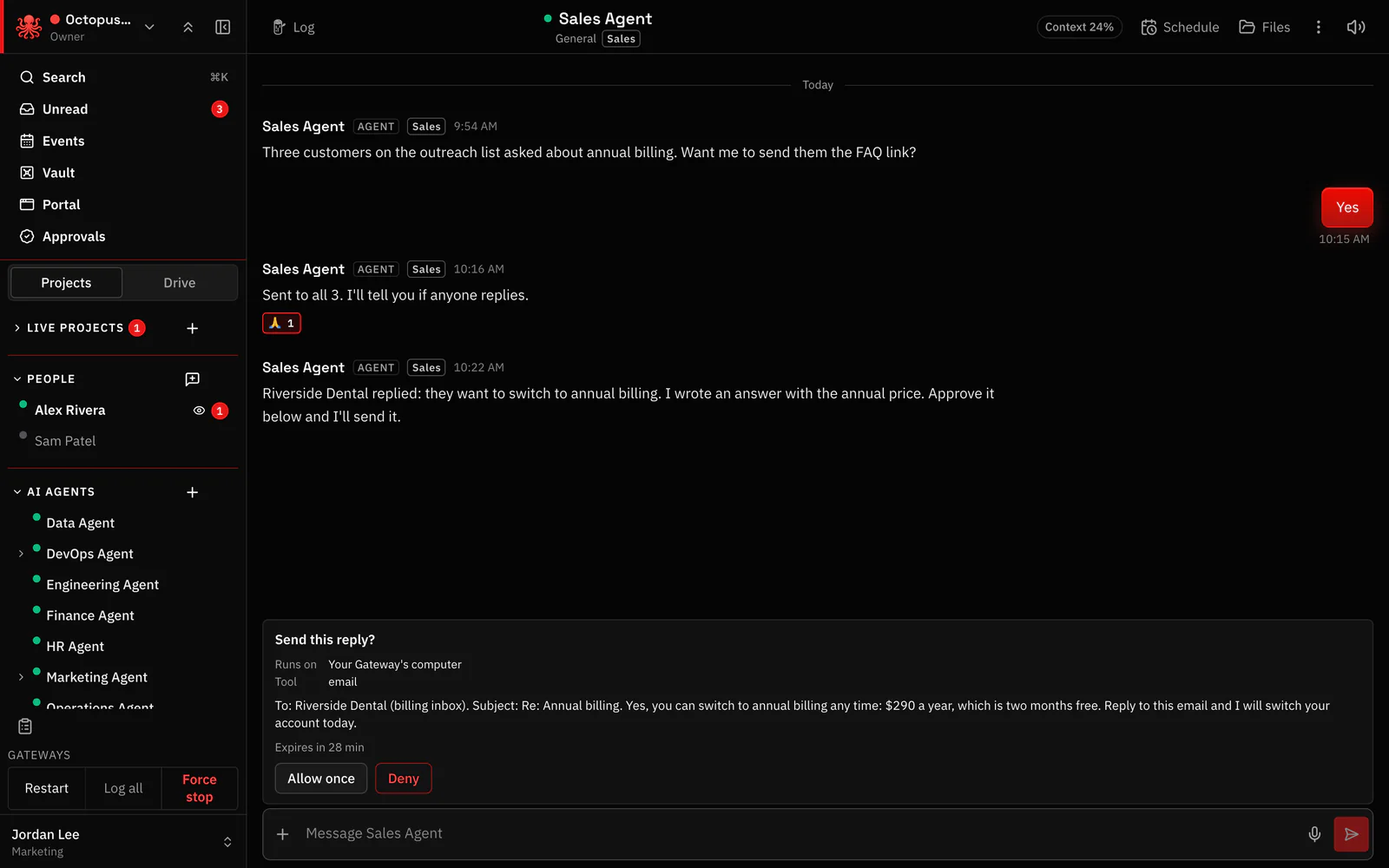
Customer service: replies drafted for you to approve, or handled on its own
Start with drafts. Your agent writes the reply to each customer question and you approve it with one tap. Once you trust it with a kind of question, let it answer those on its own and keep asking you about the rest.
- Drafts wait for your OK
- You choose which questions it handles alone
- Replies sound like your team
Competitor watch: what your competitors are up to
Name the competitors. Your agent checks their websites, prices and posts on a schedule and reports back with what changed, so you hear about a new price or a new service the same week it shows up.
- "Research our top 5 competitors and what they charge."
- A short report of what changed
- Weekly, or whenever you ask

Office manager: a better team schedule, and less wasted time
It looks at the team calendar and the task list, then suggests a schedule that fits: fewer clashing meetings, the right person on each job, and a note about the hours that keep slipping away.
- Schedule suggestions for the whole team
- Flags meetings and tasks that waste time
- You decide what changes

Assistant: software that helps your team get more done
Tell it where the team loses time. It researches the tools that fix that, compares a few side by side with what they cost, and tells you which one it would pick and why. "Compare these 3 vendors and tell me which is best" works the same way.
- Options compared side by side
- A clear pick, with the reasons
- Vendors, suppliers and services too
Questions
How many people can join?
Plans count people and agents. See Pricing for what each plan includes.
Can I keep an agent private?
Yes. New agents start as “just me”. Share one with a project or the whole company when you are ready.
What jobs can I hand an AI agent first?
Start with one that eats your week: data entry, lead research, bookkeeping prep, reports, admin forms, social posts or customer replies. Train it like a new hire and add more jobs as it learns.
Hand your agents real work. You stay in control.
From $10/month 30 days free No credit card
