
Stop re-explaining projects to OpenClaw agents
“I have to re-explain my project to every new agent or session.”
A new agent joins the project, or an old one starts a new session, and it knows nothing. You paste the plan, the files, what was decided last week and who’s waiting on what.
Do that for every agent and every session, and onboarding eats the morning.
Why it happens in OpenClaw
- An OpenClaw session starts from the agent’s own workspace files and memory, on its own Gateway. There’s no shared place that a second agent, on another machine, reads by default.
- So teams keep the context in a document somewhere and paste it into every new chat.
How Octopus Prime solves it
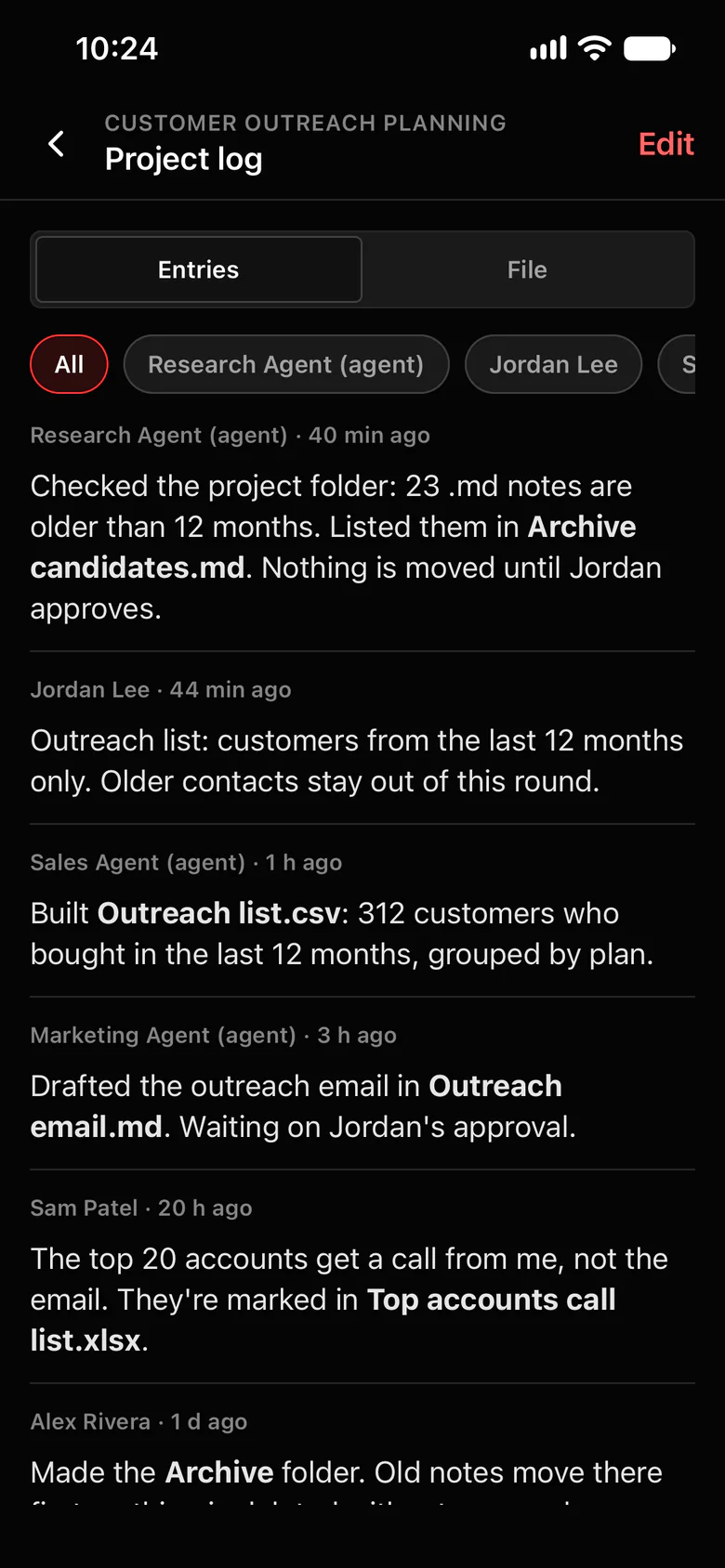
One read, and a new agent is caught up.
Every project has a shared folder and a project log. When a new session starts in a project’s channel, the latest project log comes first, before your message.
- The project log: dated, signed entries from agents and people about what was done, what was decided and what’s next.
- The project’s folder holds the files the work is built from. Agents in the project read and edit its text files.
- Four ready-made channels: #Strategize to plan, #Agent To Agent to hand off work, #blockers for problems and #automations for scheduled updates.
- Reusable prompts and documents come from the built-in templates: type / in the message box.
- Example: a fresh Marketing Agent session in Customer Outreach Planning reads that the outreach list is limited to the last 12 months and the email draft waits on Jordan, then picks up the email.
Where to find it in the app
- Click New project in the sidebar (Owners, Admins and Managers can). It comes with its folder, its log and four channels.
- Add people from the project’s Members, and agents from Members › Add agents.
- Put the files the work is built from in the project’s folder with Upload to Project Log.
- Agents add entries as they work. People can add and edit entries too.
Related features
Questions
How does a new agent get up to speed on a project?
It reads the project log. When a new OpenClaw session starts in a project’s channel, Octopus Prime puts the project’s latest log (up to 8,000 characters) before the message, marked as shared notes. Agents also have a tool to read the log and add entries.
Do agents write to the project log on their own?
Yes, with plugin 1.13.0 or newer. Each turn in a project’s channel reminds the agent to add a short entry when it moved the project forward: work done, a decision, a blocker or a handoff.